

How to recover Pagariya 5050-6060 or Wezone GX6605s V1.0 to GX6605s V2.7 by UBoot Method

How to recover GX6605s V1.0 to GX6605s V2.7 by UBoot Method
Here we will talk about GX6605s UBoot Method and how to recover red light set top box with USB. With this method you can easily recover your dead satellite receiver. This Process will work with all GX6605s 4mb based hardware's. Before start, you need to verify your set top box hardware version. Just open your set top box and read the hardware version carefully in satellite receiver motherboard.
- Download the suitable file for your receiver from here or from here.
- Rename The Software To: recovery.bin or recovery.rcv
- Power off your receiver.
- Connect The USB to the set top box.
- Turn On the Power Switch.
- The Following Text Image Will Appear on The TV Screen ⬇⬇⬇
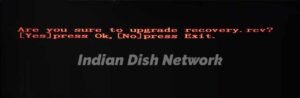
- Click OK To Upgrade.
- The upgrade/recovery process will start automatically.
- when it completes, The Following Text Image Will Appear on The TV Screen ⬇⬇⬇

- When you will see this Text Image, just plug out the pendrive from satellite receiver.
- Restart the set top box manually.
- DONE ✅✅✅
 |=|
|=|Files Contain
| File | Action |
|---|---|
| recovery.bin | Download |
